Today I discovered Firefox Synch and enabled it for both the Dell G5 and the MacBook Pro.
This will make updating bookmarks and passwords a lot easier!

Today I discovered Firefox Synch and enabled it for both the Dell G5 and the MacBook Pro.
This will make updating bookmarks and passwords a lot easier!
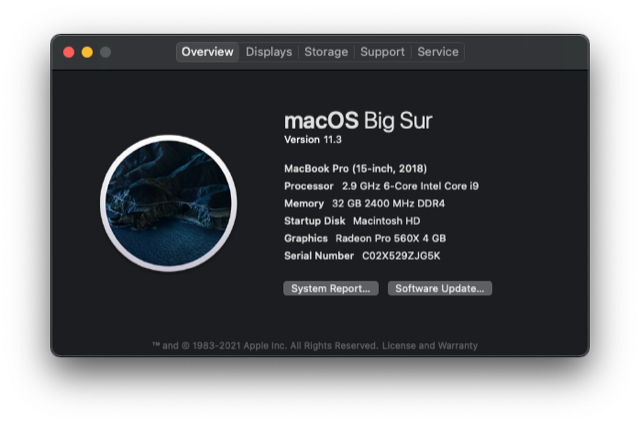
macOS Big Sur was updated today:
Camtasia 2021 was installed on both the Dell G5 and the Macbook Pro.
I was working on another martial arts page having to do with chishi (not yet completed) and decided to start migrating non-work-related bibliography items to the PC.
This meant installing Zotero and the Firefox connector, and GIMP so I can process images for this website.
I installed a copy of the Microsoft Office version 18.2008.12711.0 through the Wilfrid Laurier University connect site.
Downloaded and installed the most recent DLC Builder (2021-04-24) for Rocksmith.1)Note that this software is still in early phases, so updates are fairly frequent.
This tool requires that WWise also be installed and run at least once, which, in turn, requested the installation of the Microsoft .NET framework (the appropriate link being provided at that time).
A how-to discussion regarding DLC Builder was hosted by Alfonso De La Guardia with presenter Cédric Schneider on Saturday, 25 April 2021 through Google Meet. A link to myrecording of the session will be made available soon.
Notes
| ↑1 | Note that this software is still in early phases, so updates are fairly frequent. |
|---|
On 7 April 2021, my new Dell G5 5000 computer arrived, and I couldn’t help myself, I just had to boot it up and do some configuration.
Beside the obvious Windows 10 stuff, I installed the following:
For the time being, I have it connected to my old Philips 27″ monitor, but if and when needed, I can connect the Philips 33″ 4k monitor which is now attached to my MacBook Pro.
Then I powered it down and unplugged it as I didn’t have a suitable power bar and surge protector and didn’t wish to take any risks!
This will be my development machine for the PC side of the house, as well as my primary leisure activity machine going forward.
Recently, I have been experiencing problems with my ergonomic Bluetooth keyboard1)Microsoft Surface as Apple doesn’t offer one. and my Magic Trackpad 2.
The keyboard has been unavailable at boot-up since, say, a week or two (prior to updating from Catalina to Big Sur, which I’ve just done) .2)I understand that non-Apple products can be expected to take a little longer to be recognized—though I don’t know why—but it makes no difference how long I wait. Once I’ve logged in, it becomes available without further problem and functions normally. The trackpad, on the other hand—also a Bluetooth advice, but Apple-made, obviously—is available as soon as I attempt to use it but is intermittently sluggish after boot-up. In the latter case, the problem seems to have begun with the move to Big Sur.
The following solutions have been proposed by Apple:
I have so far attemped solution ##1, 2, and 3, as well as the first step described with regards to resetting SMC (viz., holding the power button down 10 seconds, then booting up) for the trackpad, so far without any improvement to trackpad erratic behaviour.
I am delaying doing the attempt with the keyboard as I have in the past found pairing the Microsoft Surface keyboard to be difficult, and, as I’m in the middle of my teaching term, can’t afford the problems which would ensue should the keyboard not repair. I’ll fiddle with this at end of term should the issue persist. (It is, after all, not that big a deal to enter the boot-up password on the built-in keyboard, as I don’t use a docking station.)
This morning (ca. 5:15 am), I experienced a new problem at boot-up: I was unable to enter the password at boot-up. It was not just invisible, the keys were not registering at all!
I powered down and rebooted, to no avail. Eventually, I was offered the cryptic advice that I should reboot which would put me into Recovery Mode, where I could address the issue.
I did so, and thanks to the trackpad, was able to choose a bullet-point option corresponding to non-functional keyboard, and was then invited to turn off FileVault. As I had no other choice, I did that, and was able to log in normally.
What is that all about? I posted an update to my Apple contact through the messaging system as this is not only worrisome but potentially related to the problems noted above.
After today’s two lectures, I decided to shutdown the machine and continue the SMC reset procedure (shut-down, hold left-control, left-alt, right-shift for 7 seconds, then press the power button, hold for another 7 seconds). The Mac booted up, and the Bluetooth keyboard was available to type the password!
This was not quite what the script predicted: I was supposed to push the power button myself after the second set of 7 seconds to boot up the machine. So I shut the machine down again, waited a few seconds to be sure it was good and truly shut down, then powered it up again.
The Bluetooth keyboard was still available for log-in. So it looks like I’ve licked the Bluetooth keyboard part of the issue, but I’ll keep an eye on it to be sure. Let’s also see whether the trackpad behaves any better now.
After a few days, the Bluetooth keyboard continues to be available at boot-up, however the trackpad continues to be erratic.
I read the two articles recommended above by Apple, but found nothing there which was relevant and which I’d not already tried.
I tried booting up in Safe Mode. As far as I could see, the trackpad functioned normally; but unfortunately, I couldn’t do any real work in that mode (besides the fact that everything else performed poorly) so it didn’t prove to be much of a diagnosis. When I rebooted normally, the trackpad behaviour was as bad as ever. Incidentally, I did turn it off and on again, as I’d heard that this sometimes makes a difference, but it did not.
Finally, I reset NVRAM as well. No change.
Here’s where we stand, at present:
Two other things which one might try:
No cigar.
My support person called back on Saturday, 5 December. Apparently, we’ve pretty much covered all possibilities, with the exception of re-installing Big Sur or wiping the system and re-installting Big Sur and the file system from backups.
She was skeptical of the value of this, as that was done recently, towards the tail end of the Catalina OS. I indicated that I could try the first option at some point when I had some time available, but as for the latter, that would have to wait until end of term, since it would be long and tedious and impracticable in the mean time.
I have tried neither of these—yet.
I’m not the only one with Bluetooth problems, it seems; there are many reports of Bluetooth audio problems, but I haven’t tried audio, though maybe I should, just to see?
One site suggested deleting the associated plist file, so I decided to try that. Apple had suggested a similar procedure for one of my earlier problems, after all.
I’ve now (December 7, 6 am) done that.
Notes
| ↑1 | Microsoft Surface as Apple doesn’t offer one. |
|---|---|
| ↑2 | I understand that non-Apple products can be expected to take a little longer to be recognized—though I don’t know why—but it makes no difference how long I wait. |
| ↑3 | Which does happen; it turns out that this was the case with my last problem, as it happens. |
| ↑4 | That said, having temporarily paired the old Magic Trackpad and disabled the new one made no difference either, so I think we can eliminate the trackpad hardware. |
| ↑5 | This also suggests to me a software issue on the previous point. And I would add that occasionally, I seem to sense a lag in the Bluetooth keyboard response, as well, though that is much less obvious than the trackpad issue, which is glaring. |
| ↑6 | I opted to rename it to com.apple.Bluetooth-old.plist. |
Yesterday I had my university password reset. It had been a while, and my Mac informed me that there had been a data leak. Better be safe than sorry, right?
Well, the reset protocol didn’t work, and it was a major ordeal to get help with that on a Sunday, but it got done in the end. I now ‘enjoy’ a macOS-generated high security password.
I discovered this morning that for whatever reason, it hadn’t propagated to my iPhone, despite the iCloud synchronization being turned on. No idea why. So when Outlook asked me to do an Office365 sign-in, I dutifully obliged.
But … the old password did not work. The new password did not work. The iCloud password did not work. My computer’s administrator password did not work ….
Then I had an idea. When attempting to enter the password on the iPhone, of course the input turned to bullets; expected, but there was no ‘show’ option to see that I’d got it right, though it looked right as I typed it. So finally, I typed it into the body of an email, verified it against the Keychain password on my Mac, and copied and pasted it in. Presto!
Apparently the iPhone was either capitalizing or performing some other idiotic ‘correction’ which I could not see!
For the last few days, my Philips external monitor has not come on when I’ve booted up my MacBook Pro in the morning.
Oddly, I discovered more or less by accident1)During my last hardware debugging session, I had moved the power cable from a port on the right to a port on the left. But remembering that apparently having it on the left can result in overheating, I moved it back to the other side. that if I unplugged the HDMI to USB-C adapter and moved it to a different port, the display would spring to life. Ok … that’s at best a work-around, not a solution—as I indeed found out later.
Things I tried in order to resolve the issue:
I contacted Apple Support under my Apple Care plan, and once I’d convinced the person at the other end that I’d tried all this, I was escalated to a senior adviser who had me do the following:
He was confident this would solve the problem. He was wrong.
He had told me that if that didn’t work I could escalate to Apple Engineering, and he’d put a note on the case to that effect, but warned me I’d have to use the phone for that, rather than chat (likely due to the reboots I’d be likely to have to perform?). So I called in again.
Asked to escalate to Apple Engineering. Whether that’s what they did or not, I don’t know. In any event, the new person reviewed the whole business with me and agreed that since this started happening right after the last patch to Catalina 10.15.7,3)Again, I had the code stored, but lost that …. it was likely an operating system issue and a restore to a previous point could prove that.
Unfortunately, the last time I contacted Apple (to get my input method for cuneiform running again), the solution, which involved resetting the SMC and NVRAM, inadvertently put my back-up system off-line, which I was unaware of until 10 days later when my system kindly informed me that I hadn’t done back-ups in 10 days!4)I will try to post on that shortly if I have the time, then come and back-fill this post with the link. So this left with me only two options: backing up to October 25th (a long way back from ‘today’, which at the time was November 12th), or to November 10th;5)I think. Thanks to everything I’ve done since, and my poor memory, it’s hard to be sure. I opted for the latter as the less painful option.
Keeping in mind that I’d only just experienced a loss of back-up system, this was not the most comforting solution—and maybe a bit like dropping an atom bomb to kill a mosquito—but I didn’t like the idea of living with the problem, so in for a penny, in for a pound ….
Started the back-up. ETA to completion: 40 hours. Ok, so we know that’s likely an over-estimate based on insufficient experience, and likely to go down, but still.
As there was no point the support person sitting around for hours, she sent me an email so I could let her know when it was done and we could resume debugging, if and when. My options were to reply to the email with text or to click on a link in the email to go to an Apple messaging site where I could leave a voice message of up to 5 minutes. Good.
I monitored it regularly, with my heart in my mouth; indeed, the ETA dropped more and more rapidly, so it looked like it might finish around midnight. At 8 pm or so, I saw that it had recovered 605 GB or so and had 4 hours to go. Unfortunately, at 9, I saw the same thing.
This is when you have a serious decision to make, based on the undecidability problem: when an algorithm halts, you know it halts (and has either done what it should or not); but when it’s still running, it may halt in future, or it may not. We were in the second part of undecidability, and it certainly looked like the thing was stuck. So, decision time:
I chose door #2.
Good call; it finished around 10 pm, at which point I set about the task of tidying up a variety of little things, including turning off automatic updates in System Preferences and automatic back-ups in Time Machine, as a precaution, so nothing would get clobbered inadvertently before I’d had a chance to confer with the Apple Support advisor.
I dutifully opened the email from the Apple advisor and the first thing I noticed was that although she reiterated that I could just reply to the email, it actually came from noreply@apple.com. This was not encouraging, to say the least, but I sent an update anyway.
Then I clicked the link. I won’t go into the gory details, but over the next day and a half I have experienced
Repeat ad nauseam; the last is the least frequent occurrence.
Fortunately, she said she’d contact me next time she was in the office. Her office days being listed as Tuesday through Saturday, I expected a call Friday. I didn’t get one. I also didn’t get one today, Saturday (office hours start at 10:00 and it’s now 13:13).
Short version: there is no Apple Support, take three.
This left me wondering what to do next, as I was facing another undecidability problem, the algorithm this time being ‘response from Apple Support’. I decided to instal Big Sur, since going backwards had done no good ….
Ordinarily, I take my life in my hands and just do it. But, having run out of ordinary feelings, I decided to do the Right Thing and perform a back-up.
Enter Time Machine, start backup. Back-up disc not found.
Say what? no, not the Hot-knife Boogie. The RAID drive was asleep. I haven’t yet figured out how to wake it up gently, so I did the violent thing and powered it off, then on again. And guess what ….
The external monitor came on.
Now, the external monitor is plugged into the same adapter as the RAID USB cable, so presumably there’s a connection (no pun intended) but I’m not sure what. It could still be some kind of software bug, or it could be the adapter, but that seems less likely under the circumstances.6)I did order a replacement/spare from Amazon yesterday, for two reasons: a) an on-line order from Apple would take 10 days to arrive, b) a trip to the nearest Apple Store would cost me most of a day, c) it would cost me CAD 89.00 plus tax while the third party option was half that and thanks to Amazon Prime was likely to arrive the same weekend. (Aha! Among my considerations were such elements as …. And I’m not expecting the Spanish Inquisition!! Yeah, yeah, I know—nobody expects the Spanish Inquisition-nah! Just shaddapayouface.) In fact, I’ve just now received an email saying it’s being delivered, a whole day early!
Ok, so I do have a backup from yesterday and I’ve done next to nothing since then, so never mind the back-up, let’s go for the gusto and do the installation of Big Sur.
My system informed me the download of the new OS would take two hours. Instead, it took about one.
Installation took a half hour. Then some more time once it rebooted. So in the end, maybe two hours total.
And then nothing happened. It started the reboot, and I ended up with two blanks screens.
Undecidability #3: do I do a reboot with the power button or wait? Well, waiting has worked well so far, so off to lunch and we’ll see when I get back.
Nice lunch: toasted tomato sandwiches using my tasty kalamata olive bread. Yum.
Return, check computer: nope, still two blank screens. <Insert swear words here.>7)I really just mean this for effect because in fact I did no such thing. I think I’m all out of negative emotions, having expended them the last few days already.
Shitsky, as they say in Russia. Ok, guess we’ll have to do the power button thing. Well, I don’t know whether I touched the trackpad, whether on purpose or by accident, or whether grazing the power button had the effect, but in any case, both monitors came up, and I was dazzled by Big Sur. A better name for the theme might have been Big Disappointment, but I’ll let you follow the link if you want to know what I was thinking in detail.
So now the big question is: what will happen if I shut down now, and do a reboot from off? The RAID back-up is asleep at the moment, so it will be interesting to see what happens. I’ll be back in a moment to let you know. (Thank God for ‘Save draft’!)
This is totally weird. (Unlike, presumably, everything I’ve said so far.)
When I shut-down, the RAID back-up drive woke up. I’ve noticed this before, but had forgotten. I guess it just makes sure there’s nothing lying around it should attend to before we go down. Well, so much for rebooting with a sleeping RAID back-up; I guess we’ll see what happens in this scenario, and I can always do it again and wait for it to go back to sleep before rebooting.
The monitor on the laptop came on. The external one did not. This is like the recent days when I’ve had trouble getting the external monitor to display; in the past, if memory serves (could be a medium-sized ‘if’), both came on immediately. Bummer. Still have the problem.
Boot up slider bar progresses—seems to take quite some time—then the screen goes blank. What?? Oh, wait—it came back … and the external monitor came on. Okaaayyyy ….
I guess I’ll shut down and wait until the RAID drive goes to sleep, and try again.
Only the laptop monitor comes on. There’s no flicker and then two screens. End of.
Then I had another idea. I moved the RAID drive to that adapter from the back of an Airport Extreme, whose only function was to provide a port to the RAID back-up, after my interchange with Apple about the dead back-up system. The last person I talked to told me that my set-up wasn’t supported, and the one previous to that had suggested moving it directly to the Mac; so I did that.
It solved the back-up problem … but it could be that it introduced this one. So I decided to try something.
I shut off the system and made sure the RAID drive was asleep. Then I unplugged the RAID drive from the adapter. Then I rebooted.
Presto! Everything is fine. When the system was running, I plugged the RAID cable back in. RAID came to life.
So this rather suggests that there’s some contention on the port and that maybe I need to put these things on different ports.
Fortunately, the ‘spare’ multi-adapter should be here within a few hours at most, then I can test that theory. Stay tuned!
It seemed to me that there could be two potential issues leading to the port problem:
The second theory was the simplest, since it just involved replacing the adapter without moving things around, so I tried that first.
When I shut down, the RAID drive came to life, presumably to do some kind of clean up or other. Well, fine, let me reboot and see what happens. Reboot fine, both monitors came on! Well, may as well get some work done, do a back-up. So I did.
An hour or two later, I shut down again. At same later point I came back, and the RAID drive was still sleeping, so did a reboot. Monitor came on. Ok, looks good.
This morning, same thing. Monitor came on, RAID remained asleep. Now, does that mean that the RAID is now off-line? Easy to test: perform a back-up. Did that; no problem: RAID came to life and the back-up was performed, lickety-split, as nothing much had happened since the night before.
I also noted that my cuneiform .inputplugin, which had become dysfunctional (greyed out) over the course of yesterday’s activities, is now functioning just fine.
As far as I can see, case closed.
Nothing is ever closed in the world of computing!
As soon as I actually started to do some work, I had to open MS Word because a student had submitted a .docx file rather than a PDF. Sigh.
It crashed upon load, repeatedly; the message suggested I try to re-instal. So I did. Another 1.2 GB song-and-dance, but it’s working again now.
For now.
Notes
| ↑1 | During my last hardware debugging session, I had moved the power cable from a port on the right to a port on the left. But remembering that apparently having it on the left can result in overheating, I moved it back to the other side. |
|---|---|
| ↑2 | One was in my home settings, one was global; unfortunately, even though I’d saved this information, it was lost in the steps which follow. |
| ↑3 | Again, I had the code stored, but lost that …. |
| ↑4 | I will try to post on that shortly if I have the time, then come and back-fill this post with the link. |
| ↑5 | I think. Thanks to everything I’ve done since, and my poor memory, it’s hard to be sure. |
| ↑6 | I did order a replacement/spare from Amazon yesterday, for two reasons: a) an on-line order from Apple would take 10 days to arrive, b) a trip to the nearest Apple Store would cost me most of a day, c) it would cost me CAD 89.00 plus tax while the third party option was half that and thanks to Amazon Prime was likely to arrive the same weekend. (Aha! Among my considerations were such elements as …. And I’m not expecting the Spanish Inquisition!! Yeah, yeah, I know—nobody expects the Spanish Inquisition-nah! Just shaddapayouface.) In fact, I’ve just now received an email saying it’s being delivered, a whole day early! |
| ↑7 | I really just mean this for effect because in fact I did no such thing. I think I’m all out of negative emotions, having expended them the last few days already. |
Powered by WordPress & Theme by Anders Norén